live in a club

Connecting a smart padel court at your club

We set up the court.You bring power and network.

Equipment, cables, installation and setup are on us. The club prepares a power line, internet and a spot by the court, following a short checklist.

court live
video for players
  • 0IT rooms or network cabinets
  • 1power line per terminal
  • 24/7the court checks itself
  • 7steps from request to launch

What holds a club back

It looks like construction work

An IT room, cabinets, contractors. In fact the club prepares a power line, internet and cable ducts, and we do the rest.

Fear of outages

If the internet drops or power blinks mid-tournament, the match must not stop and the owner should know first.

No time to dig in

Your facility team needs a short clear checklist and one agreed plan, not a hundred-page project.

How the launch goes

  1. 1

    Request and survey

    We visit or get your court plan, and agree where terminals go and where the ducts run.

  2. 2

    Club preparation

    The club follows the checklist: power, internet, ducts and a base. We check photos of the site remotely.

  3. 3

    Installation and setup

    We lay the cables, install the equipment and terminals, and tune the court on real matches.

  4. 4

    Training and launch

    We show managers and coaches the terminal, admin and app, and hand access to the owner.

What the player and the club get

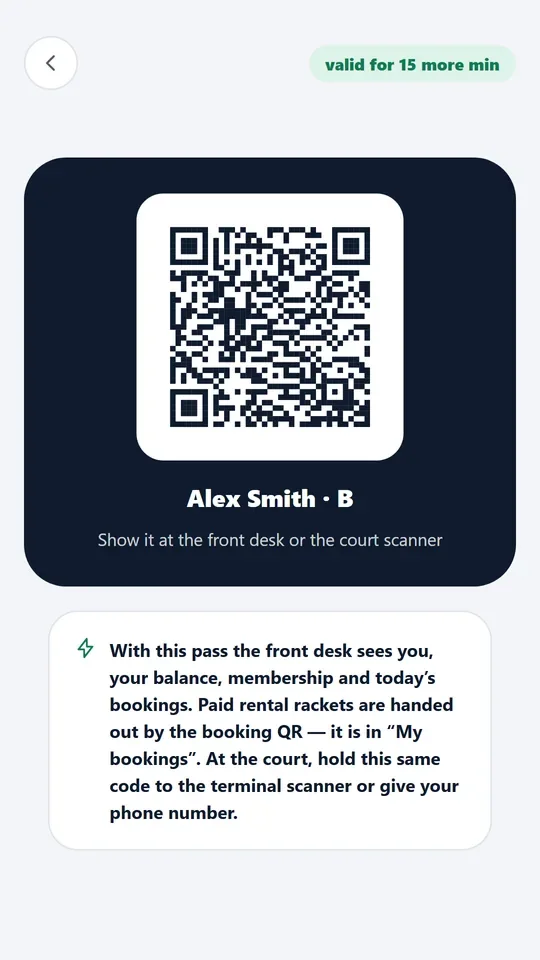
AI Padel app: a QR pass to sign in at the court terminal

Player

  • Signs in at the terminal by QR from the app, or as a guest
  • Score, replay and video from the first game
  • The court keeps working even if the club loses internet
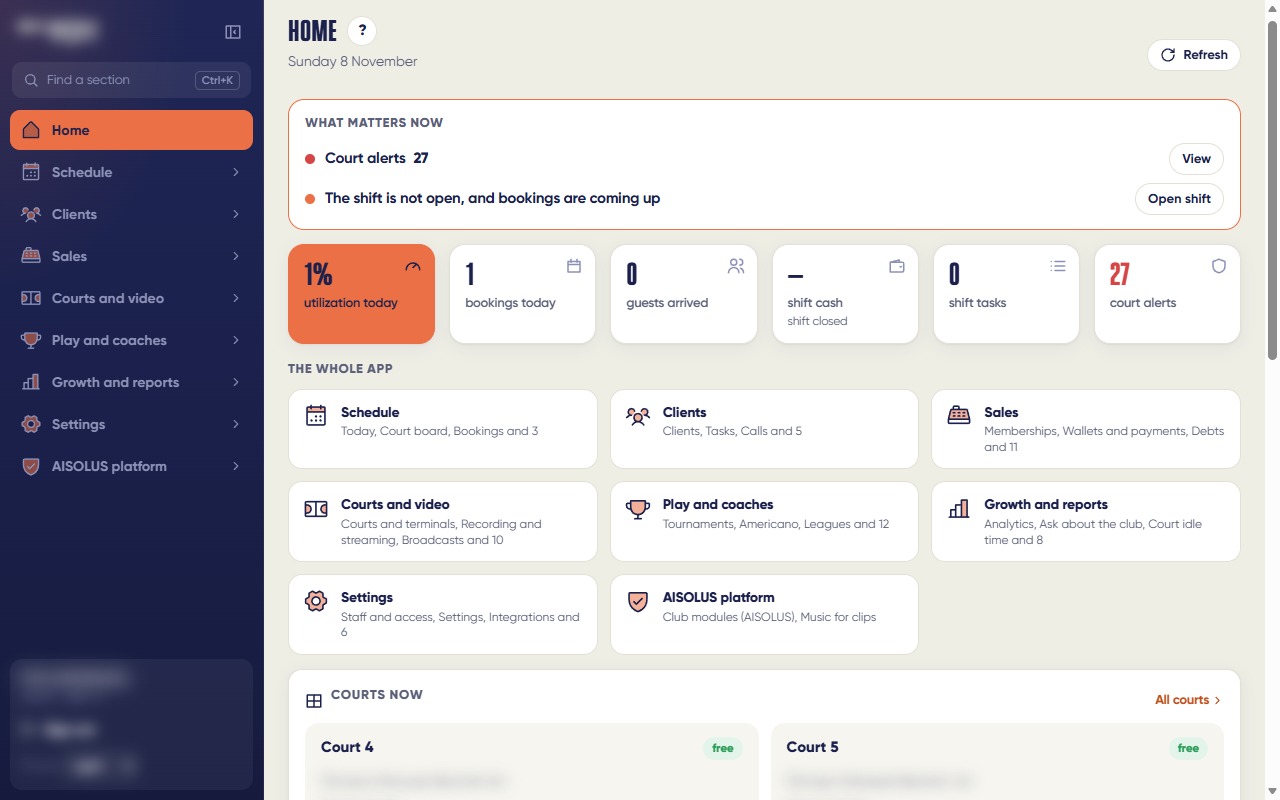
Club admin home: what matters now, the whole app in one place

Club

  • A new club is set up step by step in the admin, no developer needed
  • A scoreboard of all courts in the lobby, by a link on the club network
  • The owner learns about an outage in the admin and in Telegram before players do

A connected court at work

A working club, ordinary games, nothing staged. Faces blurred.

The match records itselfA real game recorded by the court; faces blurred
Follow the player, 9:16A vertical clip: the frame follows the player; faces blurred
A rally from a real matchThe whole court and all four players, one rally; faces blurred

What the club prepares and what's inside

Court preparation, reliability and multi-club setup in brief. We send the full checklist for your facility team after your request.

Seven steps to the first game

No ducts are laid without an approved plan, so the club never redoes the work.

  • Request and survey, plan approval, club preparation, equipment delivery
  • Installation: the court closes on agreed days so bookings are kept
  • Setup on real games: the court already works and players use it
  • Training for managers and coaches, access for the owner
  • Guide: installation up to 10 days per site, setup on games up to 10 days; exact dates are in the contract
#

Power

A dedicated 220 V line with earthing and its own breaker for each terminal, plus an uninterruptible power supply.

  • The terminal runs around the clock: at night it prepares analyses and video. Keep the line on at night
  • No heaters, air conditioners or court lighting on the same line
  • The terminal plugs straight into the backup supply, with no timers or power schedules
#

Network and internet

The club's wired internet and a network cable to each terminal. Wi-Fi and guest networks with SMS sign-in won't do.

  • Mobile internet only as a backup link, not the main one
  • Reserve a fixed address for the terminal on the club network
  • No inbound ports to open, and we don't need passwords to your network equipment
#

Cable ducts

Pipes from the terminal spot to the court along a plan we approve together before work starts. We lay the cables.

  • Smooth bends, a draw wire in every pipe, protection from water
  • A cable can be replaced without opening the floor
#

A spot for the terminal

The terminal is a stand with a screen outside the court door. A level base anchored to the floor, with pipe outlets under it.

  • No IT room, network cabinet or air conditioning for the equipment
  • A gap behind the back panel for warm air; on outdoor courts, a canopy from sun and rain
  • The power line and network cable at the base of the terminal
#

Club screen and signage

Optionally, a scoreboard of all courts in the lobby or by the bar: a spot, power and a network cable nearby.

  • A sign about video recording at each court entrance. We provide the text; the club is the data controller
#

The court looks after itself

The court checks its cameras and connection around the clock. The owner gets an alert in the admin and in Telegram, and a note when it's fixed.

  • A frozen court restarts automatically and the owner is notified
  • Every morning: a camera check and one report to the owner
  • From 00:00 to 06:00 the cameras rest while the system finishes analyses. The club can shift the window; if a match is on, it waits
#

Works offline

Score, recording, scoreboard, terminal, replay and the out lamp run on the club network. When the link is back, results and clips go to the app on their own.

  • Video doesn't stream out of the club non-stop: results, clips and analyses go to the cloud
  • Offline, the app outside the club and live streams don't work; players get video later
#

A new club and a club chain

A club is set up step by step in the admin: address, opening hours, courts, staff. The wizard shows which step is left before the first game.

  • The chain owner sees clubs side by side: bookings, court load, revenue and memberships for a period
  • Staff see only their own club; period exports open in Excel
#

Pricing

Pricing is tailored: we size it for your club. Leave a request and we'll go through your court plan and send an estimate.

#

Questions from clubs

More questions? We reply within one business day.

Do we need an IT room?

No. All court equipment sits in the terminal at the court entrance. No IT room, network cabinet or air conditioning for the equipment.

Who lays the cables and installs the equipment?

We do, or a contractor we bring. The club only prepares the power line, internet, ducts and a base for the terminal.

What if the internet drops?

Score, recording and the terminal keep working. Video and data reach the app when the connection is back.

What if the power goes out?

The backup supply holds the terminal through a short outage. After a long one the terminal starts by itself when power returns.

Can the terminal stand inside the court?

No, only outside by the court door. If courts are side by side, terminals fit well in the aisle between them.

How long does the launch take?

As a guide: installation up to 10 days per site, setup and checks on real games up to 10 days. Exact dates are in the contract.

Do we need to open ports on the club network?

No. The terminal opens the support connection itself from inside the club network. If outbound traffic is filtered, we'll give your admin a list of addresses.

Can we add a second club of the chain?

Yes. A new club is set up step by step in the admin, and the owner sees all clubs side by side.

How much does it cost?

Pricing is tailored: we size it for your club. Leave a request and we'll come back with an estimate.