
Home / All features / Court booking and club CRM
Court booking and club CRM
Players see free time on the club's courts and book in the app in a minute — with the price, court choice and payment as the club prefers. The club sees every booking on the booking grid and runs clients, memberships and the waitlist in one admin panel — and the booking appears on the court terminal right away.

What it is and why
Booking a court is the first thing a player does. Calling the front desk, messaging and a spreadsheet are slow and error-prone: double bookings, forgotten cancellations. In AI Padel players see free time by day and court and book in a few taps.
For the club a booking is more than a slot — it is a client, a payment and a game: on a smart court the match can start from the booking by itself, and the result, video and review go to the players. If the club runs YCLIENTS or MATCHi, bookings are linked with them.
What it does
Court booking and club CRM
- Free slots by day and court, time-based prices
- Court choice, rescheduling and cancellation
- Waiting list for taken time
- Booking grid, memberships, CRM and staff tasks for the club
The AI Padel app and the club dashboard; no cameras needed.
How it works
How it works
- Club and day
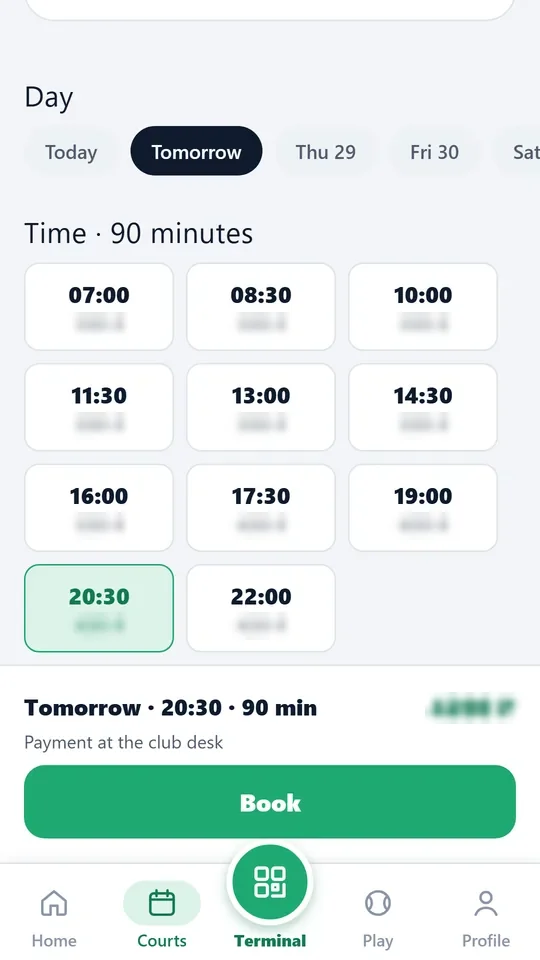
The player opens the club in the app and sees free time by day and court with the price.
- Booking
Pick a court and time and confirm. The price follows the club's price grid by day and hour.
- Payment
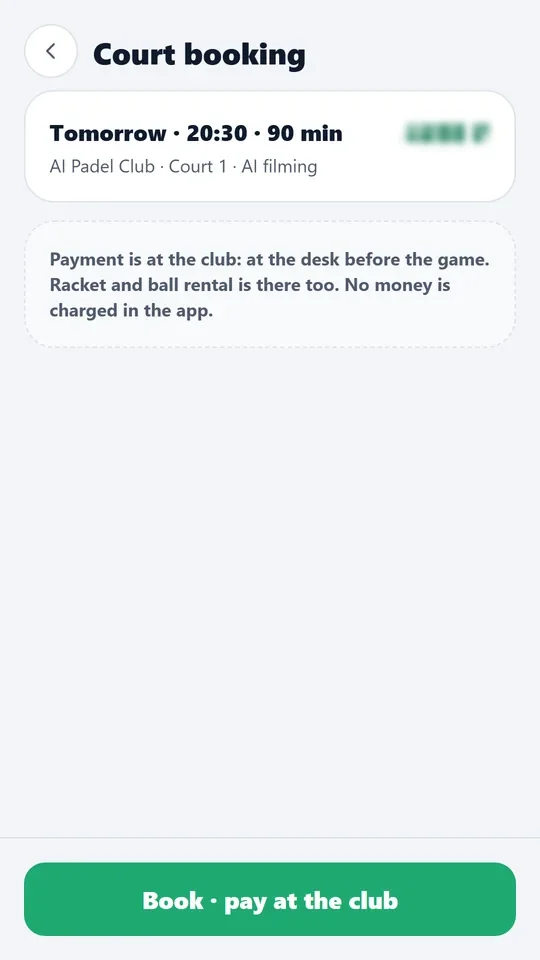
At the club, on site — at the front desk before the game. The app shows the booking price in advance.
- If the time is taken
Join the waitlist — when a slot frees up, a notification arrives.
- At the club
The booking shows on the admin booking grid and the court terminal; on a smart court the match can start from it.
- Move and cancel
In the app, by the club's rules; a paid booking is refunded by the club's rules.
- Recurring bookings
Staff set up a series: the same court at the same time every week; each booking of the series shows in the schedule grid and can be changed on its own.

What you will see
What you will see
Player in the app
Free slots by day and court, price, My bookings, move, cancel, waitlist.
Club in the admin panel
Booking grid (courts × time), Bookings, Slot waitlist, Prices, Memberships, Clients.
Players on court
The terminal shows today's bookings for the court.
Limits, honestly
Limits, honestly
- Bookings are paid at the club: AI Padel does not take players' money.
- Move and cancel rules are set by the club; the app only applies them.
- Booking needs no cameras — it works for the club's ordinary courts too.
Who it helps
Who it helps
Players
Book a court any time without calling; see the price and free courts.
Clubs
Fewer calls and mistakes, the grid and clients in one place, the waitlist fills empty slots.
Front desk
All bookings, payments and clients in one admin panel and in the desktop app.
API
API
The same data in your systems through the open API.
POST /v1/bookings # create a booking
GET /v1/bookings/my # player's bookings
POST /v1/bookings/{booking_id}/cancel # cancel a booking
Questions and answers
Questions and answers
Is payment in the app required?
No. Payment is at the club, on site; the app shows the price in advance.
Can I move a booking?
Yes, in the app, by the club's rules.
What if everything is booked?
Join the waitlist — you get a notification when a slot frees up.
Are there YCLIENTS and MATCHi integrations?
Yes, with the club's keys in the admin panel.
Are cameras needed for booking?
No, booking works for ordinary courts too.
Where does the club see bookings?
In the admin panel: grid, booking list, slot waitlist; on the court terminal — today's bookings.
More features
Court terminal
Every smart court has a terminal with a screen. Players sign in with the app QR or as guests, choose a format…
API
Everything the AI Padel app sees is available to your systems through an open API: clubs and free slots,…
Want this court in your club?
We'll show it live and size it for your club.