
Home / All features / Match recording
Match recording: video of every game in the app
Every match on a smart court records itself — no operator, no phone on a tripod, no buttons on the cameras. After the game the recording, score and statistics go to the app of all four players: rewatch any rally, show the match to a coach or download the best moments.
What it is and why
AI Padel smart court cameras film the court from several sides. The court server knows when the match started, keeps the score and cuts the recording into rallies — breaks between points, collecting balls and chatting do not get in the way of watching the game.
The recording is the base of everything a player gets after the match: My games in the app, highlights, the AI coach review, the disputed-ball replay on the terminal. Nothing needs switching on in advance: come to your booking, start the match on the terminal — and the game is already being filmed.
What it does
Match recording
- Recording starts from the court terminal — no buttons on the cameras
- Several angles from the court overview cameras
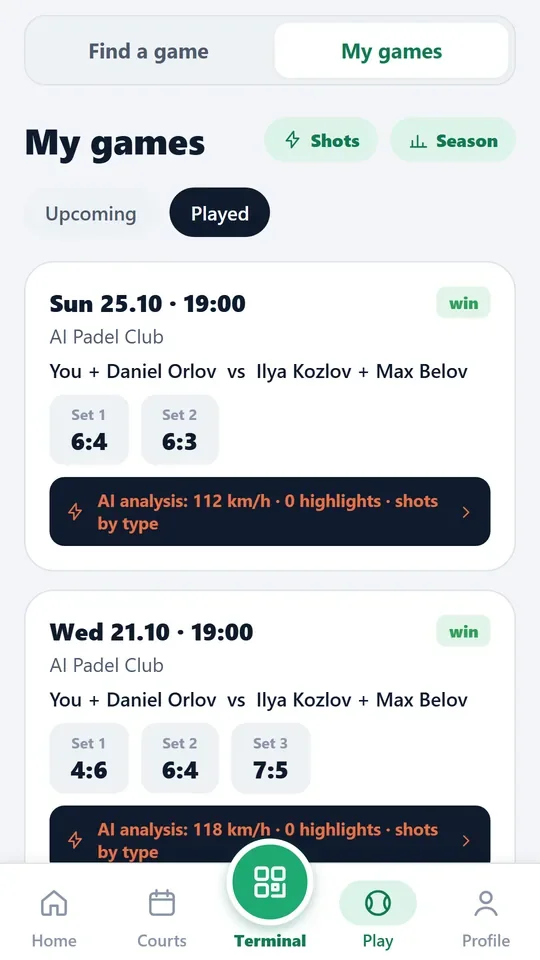
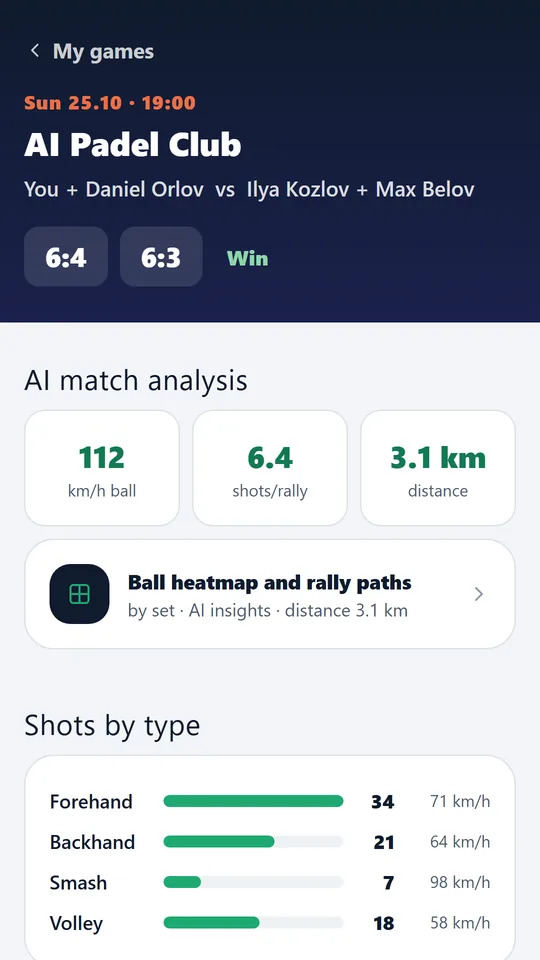
- In the app: video, score by sets, shots by type, distance covered, ball speed
- Players see their matches for the season and their progress
An AI Padel smart court: overview cameras, court server, terminal.
How it works
How it works
- The match starts
Players tap Start on the court terminal — with the app QR code or as guests. If nobody starts a match, the court server starts it by itself — from play on the court or from the booking.
- Consent to filming
Before the game the terminal asks for consent to filming. Bystanders — spectators behind the glass, players on other courts, staff — are always blurred.
- The cameras record the game
Overview cameras and ball cameras record the whole match on the court server in the club. No internet needed to record.
- The recording is cut into rallies
From the score and the ball the court server knows where every rally starts and ends and builds a “match without breaks” — just play, no ball collecting.
- The video goes to the players
After the match the recording, score by sets and statistics appear in My games for all four players. If the club internet dropped, everything is sent when the connection is back.
- Storage
The full match recording is kept for 30 days, highlights and cuts for 90 days. 7 days before deletion players get a reminder to download what they need.
What you will see
What you will see
Player in the app
Match card: video, score by sets, shots, distance, ball speed; “match without breaks” — rallies only.
Players on court
On the terminal — a replay of the last rally from any camera and a Highlight button to mark a moment.
Club in the admin panel
Match sessions: who played and when, match length, number of rallies and average rally length; Recording and streaming — what each court records.
Limits, honestly
Limits, honestly
- Recording works only on a court equipped with AI Padel cameras; other club courts are not filmed.
- The full recording is kept for 30 days and then deleted. Highlights live 90 days; download what matters in time.
- Without consent to filming the match is not delivered to players; bystanders are always blurred.
- The video appears in the app after the match, not during play: the court server first cuts the recording and computes the statistics.
Who it helps
Who it helps
Players
Your match on video without a phone on a tripod: rewatch it, show a coach, share it.
Clubs
Every booking comes with a video in the app: more value per court hour and a reason to come back.
Coaches
Recordings of students' matches to review play from video, not from memory.
API
API
The same data in your systems through the open API.
GET /v1/video/analyses # player's video analyses
Questions and answers
Questions and answers
Do I need to switch recording on?
No. The match is recorded once started on the terminal, and if you forget, the court server starts it from play or from the booking.
Who sees my match recording?
The players of that match and the club. Clips appear on the club's social media only if the player allowed it in the app.
How long is video kept?
The full recording — 30 days, highlights and cuts — 90 days. A reminder to download comes 7 days before deletion.
Can I download the recording?
Highlights and moments can be saved and shared from the app. The full recording is watched in the app.
When will the video appear in the app?
Usually a few minutes after the match ends — the court server cuts the recording into rallies and computes statistics.
What if the club internet goes down?
Recording goes to the court server in the club and does not stop. The video reaches the app when the connection is back.
Will bystanders' faces be visible?
No: spectators behind the glass, players on other courts and staff are blurred. The match players stay in the picture.
How many cameras film the match?
Overview cameras in the court corners and ball cameras. The app shows the overview camera; the terminal replay can be watched from any camera.
More features
Highlights
The court server finds the best rallies of the match by itself and cuts them from every camera — with a score…
Heatmap and player movement
Court cameras follow each of the four players through the whole match. After the game the app shows a heat…
Auto scoring
The court cameras see every rally and keep the score by padel rules: 15–30–40, golden point or advantage,…
Want this court in your club?
We'll show it live and size it for your club.