
Home / All features / Club admin and court card
Club admin and court card
Everything about the club in one window: bookings and regular clients, what is happening on each court right now, camera and connection alarms, outs and labeling, staff and their access. In the browser, the Windows app at the front desk or on a tablet.
What it is and why
A padel club juggles a lot: the booking grid, clients, the shift till, tournaments, and on smart courts cameras, recordings and streams too. The AI Padel admin panel puts it in one place with a clear menu: Today, Clients and sales, Play and video, Coaches and courts, Reports and settings.
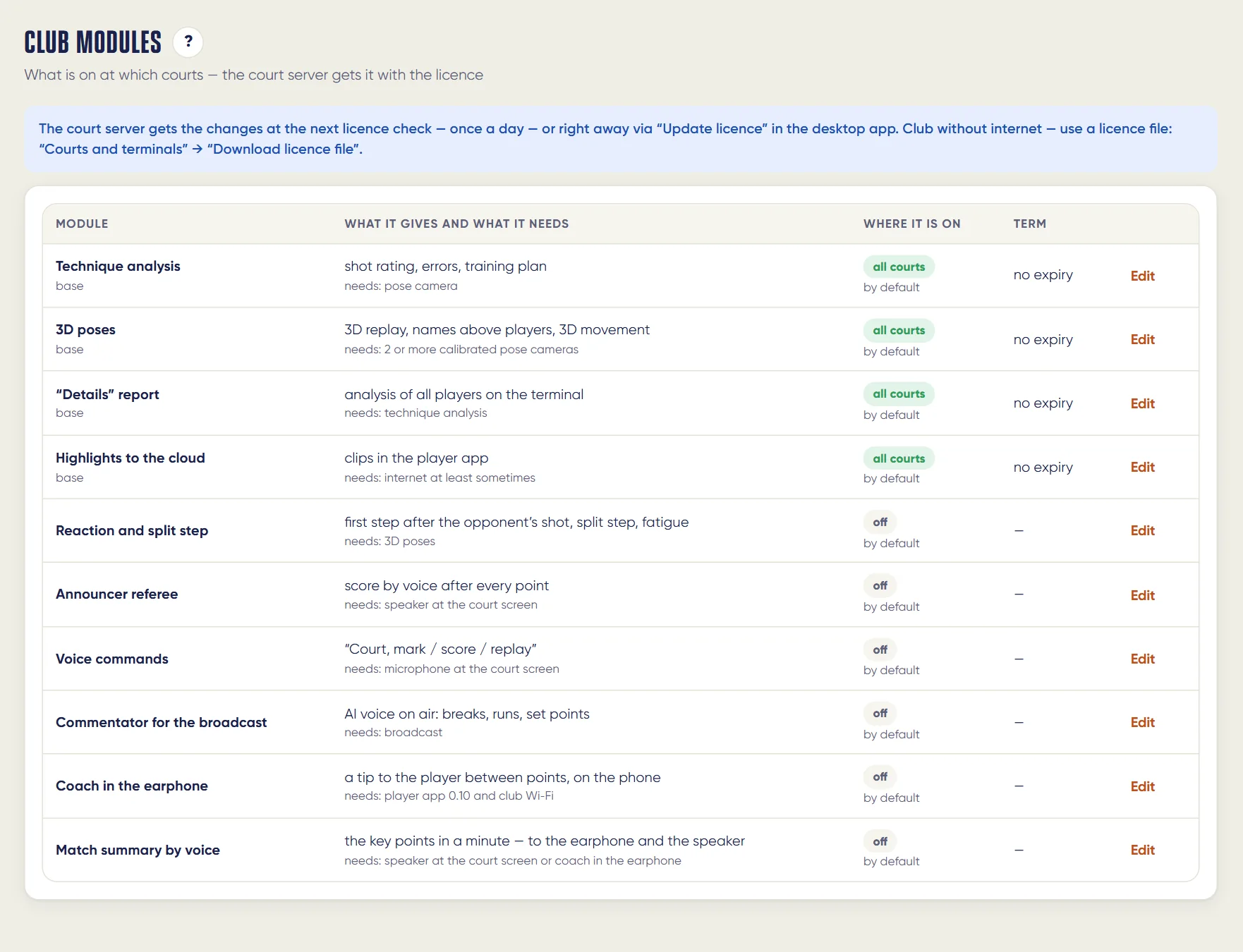
Every staff member signs in with their own account and sees only the sections open to them, and every action is logged. System functions are modules: the club turns them on for all courts or selected ones.
What it does
Club admin and court card
- Bookings and recurring bookings: “Recurring” and “Extend” in one tap
- Court card: match and score, cameras, alerts, bookings and outs on one page
- Court watchdog alerts — in the admin and in Telegram
- Staff: sign-in by phone and SMS, per-section access, action log
- Club modules are switched on from the admin
- Browser, a Windows app and an Android tablet app
An AI Padel club account; the court card needs a smart court.
How it works
How it works
- Staff sign-in
Each staff member has their own sign-in and role: admin, front desk and till, coach or view-only.
- Today
Court grid, booking grid, bookings, waitlist, match sessions, recording and streams, club screen.
- Clients and sales
Clients, memberships, prices, wallets and payments, shop, integrations with YCLIENTS and MATCHi.
- Coaches and courts
Court card: match and score, cameras, alarms, bookings; Outs in play with replay; point and ball Labeling.
- Modules
The club turns functions on and off for all or selected courts, until a date or as a trial.
- Log
Every change and sign-in is logged: who, when, what.
- Linked pages
Breadcrumbs follow the chain session — breakdown — player — moment; the Links section gathers the pages of all club courts in one place, and the video wall there is visible only to the owner.
What you will see
What you will see
Front desk
Booking grid, bookings, clients, shift till — in the browser or the Windows app with the menu collapsed to icons.
Admin and owner
Courts and alarms, staff and access, club modules, action log, analytics and exports.
Coach
Their students and groups, match reviews, technique rules.
Managers
Labeling and Outs in play: checking points and outs — the cameras' accuracy is measured from these.
In detail
Club admin and court card
Club modules are switched on from the admin
Every system feature is a module: the club switches it on for all courts or selected ones, until a date or as a trial, and switches it off. The court server gets the change with its licence — at the daily check or at once with the “Update licence” button.
Staff and access: sign-in by phone number and SMS
A staff member is added in one step: number, name and role — manager, front desk and till, coach or view only. The phone number is the login, a temporary password arrives by SMS, and after signing in the admin asks for a new one. Only the owner appoints and removes managers.
Admin app for Windows
A separate program for the front-desk PC — with the same sections as the web admin, its own menu and a light or dark theme. It updates itself.
Court card and alerts
Everything about one court on one page: the match in progress and the score, recording and broadcast, cameras, court watchdog alerts, out calls with a replay and a “correct / wrong” mark, today's bookings. Next to it — the day's alert log and open problems the court has not yet reported as fixed.
Action log
Every change in the admin and every sign-in is logged: who, when, what was done and how the server answered. The owner sees everyone's actions, a manager sees the staff of their club. Passwords never reach the log.
Limits, honestly
Limits, honestly
- The court card, outs, labeling and recordings exist only for AI Padel smart courts.
- Staff see only the sections open to their role; the owner appoints admins.
- Sections the club has not enabled are hidden both in the admin panel and in the players' app.
Who it helps
Who it helps
Owners
See the whole club and every court, who did what and where the problem is.
Front desk
Bookings, clients and till in one window, no switching apps.
Coaches
Their students, reviews and technique rules.
API
API
The same data in your systems through the open API.
Questions and answers
Questions and answers
Do we need to install software?
No, the admin panel runs in a browser. There is a Windows app and a tablet app too.
Can we see who did what?
Yes, each staff member has their own sign-in; actions are logged.
Will we know when a court fails?
Yes, the court watchdog sends an alarm to the admin panel and Telegram.
Can we limit a staff member's access?
Yes, by role and section.
How do I change my password?
In My sign-in and password — enter the current and new one.
Does the Windows app update?
Yes, by itself through the update channel.
Where do we check out and score accuracy?
Coaches and courts → Outs in play and Labeling.
Can a function be enabled on one court?
Yes, modules are enabled for all or selected courts.
More features
Court booking and club CRM
Players see free time on the club's courts and book in the app in a minute — with the price, court choice and…
Court terminal
Every smart court has a terminal with a screen. Players sign in with the app QR or as guests, choose a format…
Want this court in your club?
We'll show it live and size it for your club.