
Home / All features / Match insights on the court terminal
Match insights on the court terminal
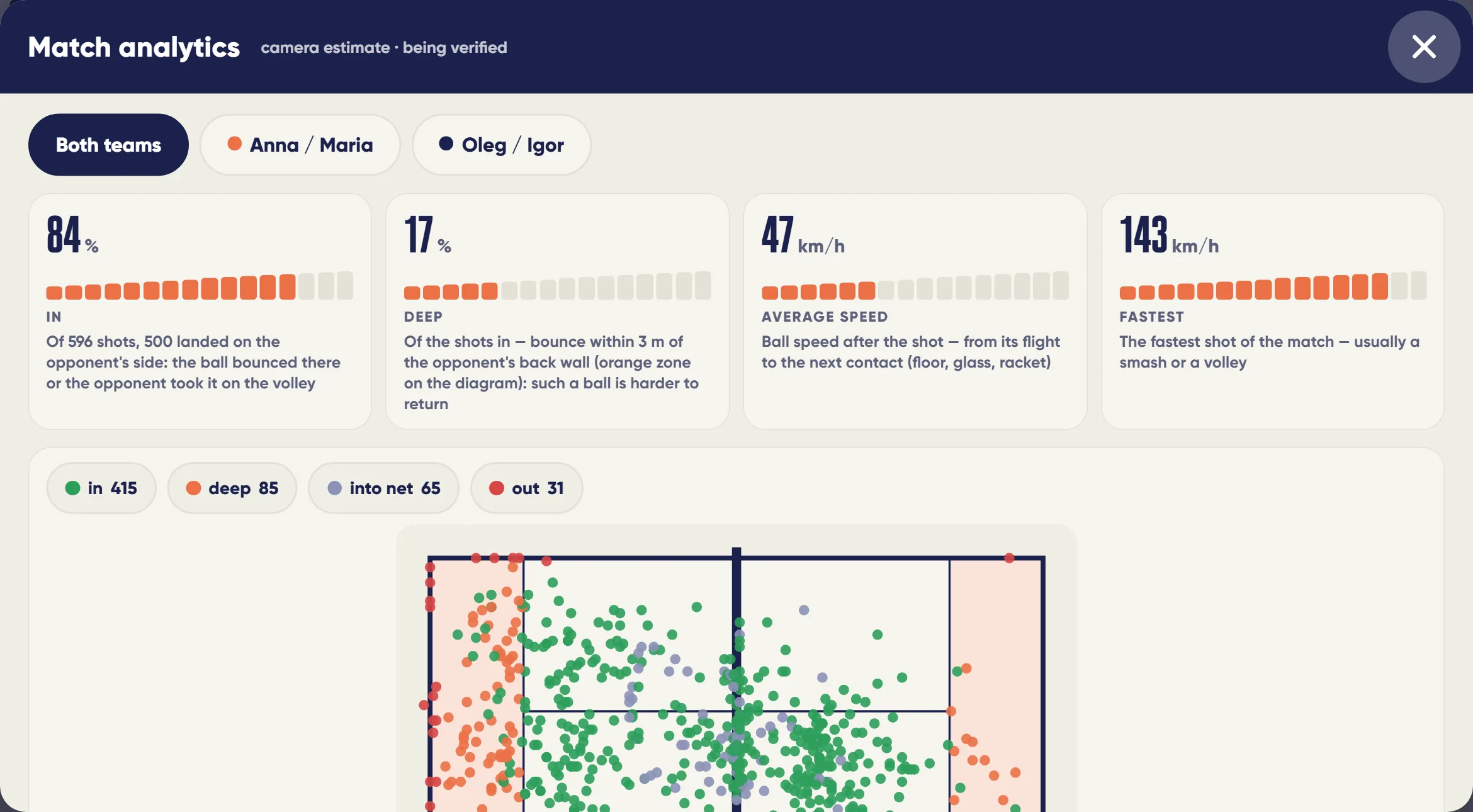
The game is over — the review is already on the screen by the court: how the chances of winning changed, where the turning point was, what worked for each pair, and in the 3D replay — where to stand in a key rally. Ask the match about your game — the answer is built only from this match's numbers.
What it is and why
Usually only the score remains after a game. The match review on the terminal shows how that score happened: a win probability and momentum chart, blocks on score and pair movement, key moments. Right by the court, while the players are still together and can talk about the game.
The court server computes the review from the cameras: score, players' 3D movement, the ball. “Ask the match” answers a question about your game, but every number in the answer comes from the match facts — the model invents nothing.
What it does
Match insights on the court terminal
- Win odds and momentum through the match — a chart on the scoreboard and in the summary
- Block-by-block review: score, pair movement, match moments
- “Ask the match”: a question about your game, answered from this match's numbers
- 3D replay with a 360° view and a “where to stand” hint
- Serve assistant, 8 match formats and a super tie-break
- The match starts by itself — when play begins or from a booking
An AI Padel smart court: court cameras, court server and a terminal with a screen.
How it works
How it works
- The match starts
On the terminal — or by itself from play or the booking. Format — one of 8, including a super tie-break.
- The cameras compute
Cameras keep score and track players in 3D; on serve the referee assistant checks foot faults and contact height.
- Summary
After the match the terminal builds the summary: win chances and momentum, score and movement blocks, moments.
- Ask the match
Ready questions about the match or your own — answered only from this match's numbers.
- 3D replay
A 360° replay with a Where to stand button: where the pair stood and where it should have.
- To the app
Players take the review to the app with the QR.
- Decisive points
The video report marks break points, set points, match points and golden points; the Won, Lost and Decisive filters show only the rallies you need.
- The match starts by itself
From the booking or after half a minute of play on court — no Start button; live 3D of the players on the terminal appears at once, with a 360° view.
What you will see
What you will see
Players on court
Match summary, win chance and momentum chart, Ask the match, 3D replay with Where to stand.
Player in the app
The review in the match card after taking it with the QR.
Club in the admin panel
Serve review after the game, match sessions.
In detail
Match insights on the court terminal
Match formats: 8 types and a super tie-break
The format is chosen on the terminal before the game: golden point, classic with advantage, Star Point, two sets and a super tie-break to 10, one set, a pro set with a tie-break at 8–8, short sets to 4 and a timed game until the end of the booking. The camera score follows the rules of the chosen format.
Match auto-start by play and by booking
If people are playing and nobody has started a match, the court server starts it by itself: the ball cameras see rallies and 3D pose tracking sees people on the court; a ball without people does not count as a game. A match also starts from a court booking. If the court was opened on the terminal and the players went to play, the match starts after a minute and a half of silence at the terminal. When the court is empty, the match closes and the summary is on the screen.
Serve assistant
On the serve the system checks foot faults — from the player's feet in 3D — and the contact height: “above the waist” is decided by the ball height from the ball cameras, not by the pose. The serving side is checked when the score is kept. After the game the club sees the serve review in the admin.
“Ask the match”: a question about your game
The match summary on the terminal has ready-made questions about the match and your own question. The answer is built only from this match's measurements: the software does the comparisons and figures, and the language model's answer is checked — every number in it must come from the match facts. Ready-made questions work without the model too.
“Where to stand” in the 3D replay
The 3D replay has a “Where to stand” button: on every opponent shot you see where the receiving pair stood and, as rings, where it should have stood by the general rules of padel positioning. Rallies from the back line are not counted as errors — they only get a hint.
Limits, honestly
Limits, honestly
- The review appears after the match, not during play (except the win-chance chart on the scoreboard).
- Where to stand is a hint by general padel positioning rules, not a verdict: baseline exchanges are not counted as mistakes.
- The referee assistant checks the serving side only when the score is kept.
- Ask the match answers only about this match; not about other games or prices.
Who it helps
Who it helps
Players
Understand where you won and lost while the game is fresh.
Coaches
Ready review material right by the court.
Clubs
Every match ends with a “wow” on screen — a reason to come back.
API
API
The same data in your systems through the open API.
Questions and answers
Questions and answers
Do we need to switch anything on?
No: the match starts by itself, the review appears after the game.
Can I ask by voice?
Yes, Ask the match answers from this match's numbers.
Does it work offline?
Yes, the court server in the club network computes the review.
What are “win chances”?
An in-match estimate of how each pair's probability of winning changed.
What does Where to stand show?
On every opponent shot — where the receiving pair stood and where it should have.
What does the referee assistant check?
Foot faults on serve from 3D foot positions and contact height from the ball height.
Can Ask the match get numbers wrong?
Every number in the answer is checked against match facts; ready questions work without the model.
How do I take the review?
With the QR in the match summary — into the app.
More features
Auto scoring
The court cameras see every rally and keep the score by padel rules: 15–30–40, golden point or advantage,…
Court terminal
Every smart court has a terminal with a screen. Players sign in with the app QR or as guests, choose a format…
3D player pose
Several court cameras see a player from different sides, and the court server builds their pose in three…
Want this court in your club?
We'll show it live and size it for your club.